|
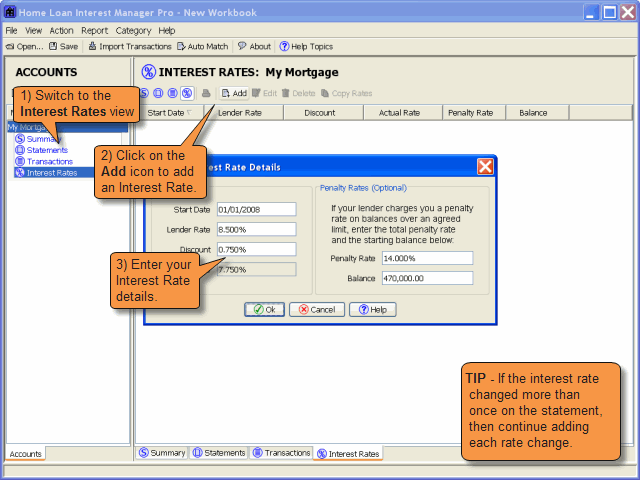
The Home Loan Interest Manager interest rate view lists all the interest rate changes for the account (mortgage, home loan or offset account).
|
|
|
|
|
|
7. Enter the Interest Rate Changes
Previous
|
|
Navigate to the Interest Rate view, and add an interest rate for each rate change on the statement. Tip - If the rate hasn't changed for the period then skip this step. If it's a fixed rate loan then enter the fixed rate.
|
|
Next
|
|
|
|
|
|
Top Of Page
Copyright ©2003-2008 Home Money Manager. All Rights Reserved.
Home Money Manager, Home Credit Card Manager and Home Loan Interest Manager
are trademarks of Home Money Manager.
All other trademarks are the property of their respective owners.
|